Cleaning up Transportation Issues.
Purpose: This article is intended to instruct users on how to clean up student records that may be causing issues with transportation.
REQUESTS
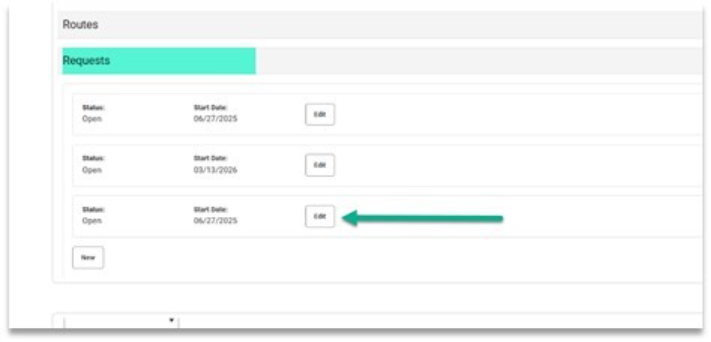
A student should only ever have ONE REQUEST for transportation!
If a student has multiple requests listed, secretaries should edit/keep --only the most recent request-- and DELETE ALL OLDER REQUESTS!
ROUTE TYPE:
ONLY MEADOWOOD may use this code for their students:
SE - Meadowood only
ONLY EARLY YEARS (EPY) may use these codes for their students:
- AD
- MA
- MP
- IA, IP, IT
All other schools should identify one of the following three codes:
- RG: Regular
- CR: Choice
- AU: Autism
Missing Transportation for a student is usually caused by one of two issues.
- The student needs a Transportation Request in IC.
- The student does not have a Verified Address.
How to update Transportation Requests
- Search the household and confirm the address has been verified

- If the address being used for transportation is not verified
- confirm the address is correct for the student
- send the DSC HelpDesk (helpdesk@dataservice.org) and email request to have the address verified
- Once the address is verified, you will need to follow the steps below.
- If the address is verified, go to the student's transportation screen (Student Information > General > Transportation)
- Confirm the correct (verified) address is being used in the Pick-Up Location and Drop-off Location in the Requests area
- If the Primary address is being used for transportation and does not match the pick-up/drop-off location, click the links Use for Pick-Up Location and User for Drop-Off location and save.


If you have any questions feel free to reach out to the DSC Help Desk at helpdesk@dataservice.org .
How to add a Transportation Request
Transportation Request instructions can be found in the Census Manual
Here is a link to the section describing how to:
How to Check Address issues